

store: true, keep the screenshotId from the response, then turn it into as many sizes
as you need — the page is not loaded again. Transformations are deterministic image
processing, not AI editing.
region, one part of it, or bounds.
The screenshotId must belong to your account and remain unexpired; regions need a
capture with regions=true, everything else does not.
Use the dashboard
In the signed-in Playground, capture a stored screenshot and switch from Capture to Transform. You can also open Transform screenshot from a monitor run. Neither action captures a page or consumes credits. Each output has a Source (complete screenshot, a saved region or part, a saved crop, or custom bounds), a Preset, and optional size, fit, format and quality overrides — the preset’s values show as placeholders. The target overlay and Draw bounds sit in the workspace toolbar next to the Screenshot/Regions switch; click a region box or drag on the screenshot to set an output’s source. Use as source on a region crop selects that saved crop. The Code tab shows the exact request, including a plain URL for a single output.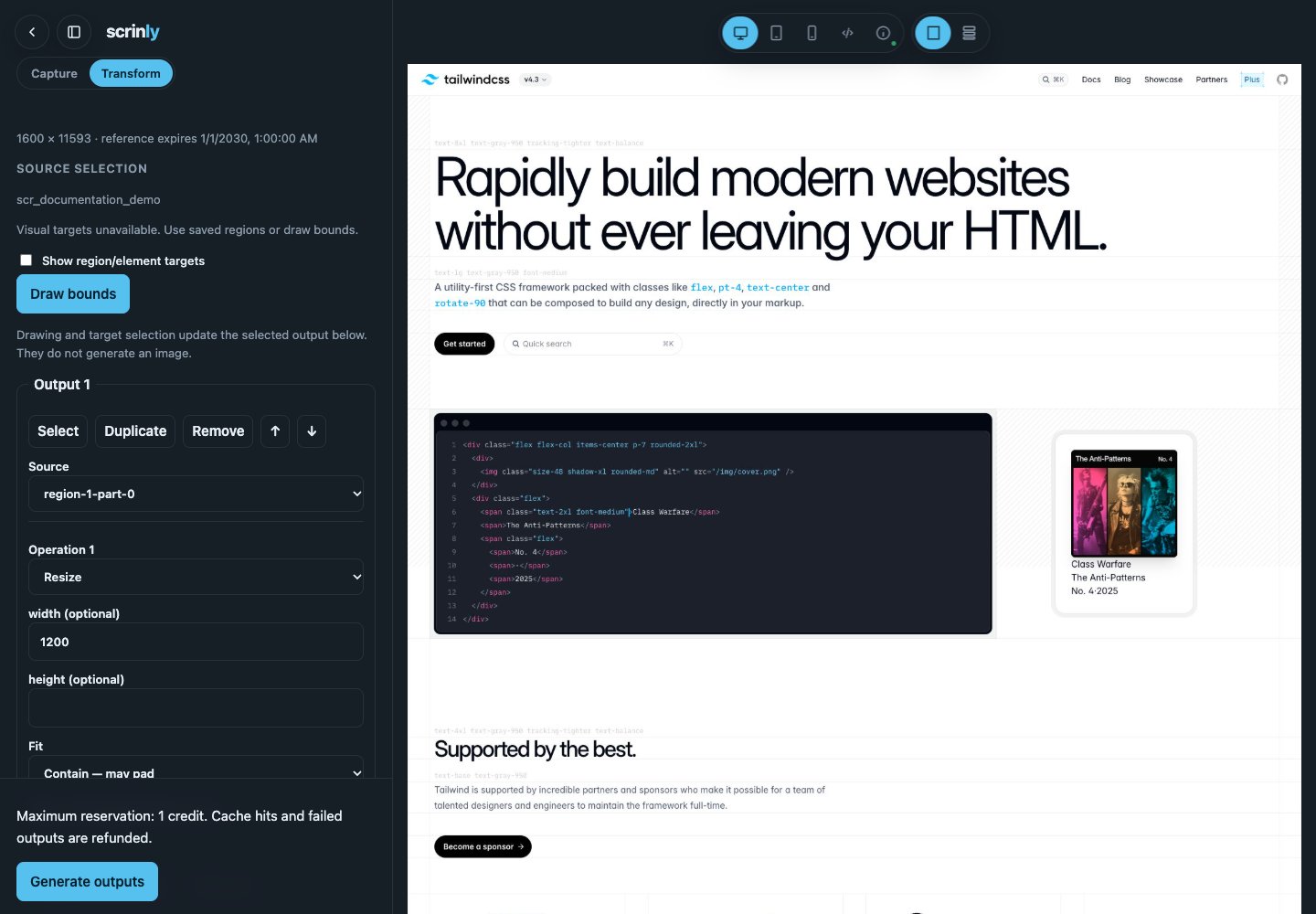
Send a transformation
GET) takes the same fields as query parameters and describes one output.
It defaults to cache=true, so fetching the same link again reuses the stored output
instead of charging again. outputs, webhookSecret and storage credentials are POST-only.
Use region and part IDs from your own saved manifest; the example ID is a placeholder.
Authentication requires the account’s bearer API key. No provider key is needed.
Presets
Any field you set overrides the preset:
{"preset":"og-image","format":"png"} is a PNG
OG image; {"preset":"thumbnail","width":240} is a 240-wide thumbnail.
On a whole full-page screenshot, the fixed-shape presets (og-image, twitter-card,
square) use the top of the page at their aspect ratio — the hero, not whatever sits
in the middle of a long page. Set region, bounds or fit to choose differently.
Choose what to cut
Use one of
region or bounds, not both. Original-pixel sources read the stored screenshot,
whose bytes, dimensions, MIME type, size and SHA-256 are verified first. A saved crop
reads the part’s own stored file instead — saved JPEG crops have already been encoded once,
and result provenance records the parent screenshot hash and original bounds. Arbitrary
source URLs, uploaded images, page headers, cookies and capture settings are not accepted.
Source size. Cutting original pixels requires the whole screenshot to fit within
64 MP and 24 MiB, even when you only select a small region. That covers most full-page
captures, including 2× ones (a 3024-wide page up to about 21,000 px tall). For longer pages,
use
savedCrop: true on a region part: the limits then apply to the crop, not the page.Size and encoding
width/height: give one to keep the aspect ratio (rounded to a positive integer), or both to set the box.fit(with both sides):contain(default) fits everything with centered padding;coverfills the box with a centered crop;fillstretches.format:jpeg,pngorwebp. Omitted, the output keeps the source’s family.quality: 1–100, default 80. PNG is lossless and ignores it.background: six-digit hex such as"#ffffff"forcontainpadding and JPEG transparency. Without it, PNG and WebP keep transparency and JPEG uses white.
Multiple outputs and credits
Put several outputs in anoutputs array (POST only). Each is a preset name, or an
object for anything more specific. Top-level fields are defaults for every output:
region, part, bounds) replaces the default
selection rather than combining with it; every other default still applies.
All specifications validate before any credit reservation. One credit per output is
reserved before source or cache-artifact downloads. Each newly generated successful output
costs one credit. Failed outputs and verified cache hits refund that reservation.
Read charged, refunded and net rather than inferring settlement from HTTP status.
Single-output success returns an assetId, parent screenshotId, resolved source,
the executedPlan (the resize/encode steps that ran), provenance, direct-storage media, referenceExpiresAt,
cacheHit and credits. Provenance includes source/output hashes, selected bounds and
the transform, browser and codec versions.
Multiple outputs return ordered results, each with an index, success/error and credits,
plus aggregate credits. HTTP 200 means all outputs succeeded; 207 means partial success.
All failed outputs produce a typed error response. Successful siblings remain available.
If settlement cannot be confirmed, an availability error supplies a job ID for free polling;
it does not claim a completed refund. Do not blindly submit a second paid request.
Storage, caching and retention
Outputs are always stored: omitstore or set it to true; store:false is rejected.
Default storage uses transforms. Existing B2/S3/R2 overrides, custom
prefixes and direct-provider URLs remain supported. No image proxy is introduced.
Single-output success includes X-Scrinly-Storage-URL; multiple outputs use individual
media.url values, without an ambiguous top-level storage header.
Caching is opt-in with cache:true on POST and on by default for the URL form. Identity is account-, source-reference-, geometry-,
operation-, destination- and engine-specific. Cached artifacts are downloaded and hash-verified,
not trusted from their keys or a HEAD response alone. Missing or mismatched artifacts are
regenerated; infrastructure failures do not silently trigger paid regeneration.
Equivalent outputs within one request can reuse the first output only with caching enabled.
Hits reuse the original assetId and metadata expiry. Cache lifetime is at most 24 hours,
bounded by both the parent reference and derived metadata expiry; hits do not renew it.
Reference retention is operator-controlled, initially 30 days. Expiry removes metadata only,
not stored images. Customer objects may become unavailable earlier under customer retention
policies. There is no asset lookup or transformation-history endpoint in this release.
Async jobs and webhooks
Setasync:true for the existing 202 job envelope and poll /status/{jobId} using
the same account’s API key. Polling is free; other accounts receive 404.
Add webhookUrl and optionally webhookSecret to request asynchronous signed delivery.
Events are transform.completed, transform.partial, and transform.failed, with the
settled response inside result. Existing webhook signature verification
applies. Delivery retries do not rerun transformations or alter credit settlement.
Limits and failures
Outputs run sequentially. A deadline preserves completed outputs and fails/refunds the
remaining outputs. Missing or cross-account references return
404; expired owned references
return 410. Typed failures cover invalid bounds, unsupported format, input size, source
availability/hash mismatch, processing, storage and persistence. Public errors never include
provider payloads or source URLs.